Static vs dynamic IP: the difference, how to check yours, and why it matters for blocking
A static IP stays the same; a dynamic IP is lent for a while and can change. How to check which you have, which to choose, and what it means when you block IPs.
On this page
A static IP address stays the same until someone changes it. A dynamic IP address is lent to a device for a limited time and can change when that time runs out. The Internet standard for this, RFC 2131, calls the second kind "dynamic allocation". For anyone who blocks addresses, the difference decides how long a block stays accurate: of 600 random addresses on FFraud's list of confirmed abusive IPs, 52 percent sat on residential lines, where addresses tend to move (FFraud data, November 3, 2026).
#What is the difference between a static and a dynamic IP?
Most networks hand out addresses with DHCP. RFC 2131 describes three ways it can do so. In dynamic allocation, it "assigns an IP address to a client for a limited period of time". In manual allocation, an administrator picks the address and DHCP only passes it on. The standard adds that dynamic allocation "is the only one of the three mechanisms that allows automatic reuse of an address", which is why networks with many short visits prefer it.
| Trait | Static | Dynamic |
|---|---|---|
| Set by | An administrator | DHCP, on a lease |
| Lasts | Until someone changes it | Until the lease ends |
| Usual on | Servers | Home broadband |
| For a block | Stays accurate longer | Can move to someone else |
IPv6 adds a third kind of change. A phone or laptop builds temporary addresses for itself, and RFC 8981 sets the default so that each one is preferred for one day and stays valid for two. So even on a line with a fixed IPv6 prefix, the address a site sees from one device can change every day.
#How do you check if your IP is static or dynamic?
First decide which address you mean. Your computer has a local address from your router, and your router has a public address from your internet provider. The settings on your computer only describe the local one.
- The local address on Windows. Run
ipconfig /all, which Microsoft describes as the command that "displays the full TCP/IP configuration for all adapters". "DHCP Enabled: Yes" means the router lends the address. - The local address on a Mac. Open Network settings, then TCP/IP. Apple's guide says to choose "Using DHCP" when your address is assigned automatically, and "Manually" when your provider or administrator gave you one.
- The public address. Open your router's status page and look at its WAN or internet connection, or ask your provider. A static public address is usually an extra: MyRepublic, a provider in Singapore, tells customers to "expect that a static IP address will increase the cost of your ISP contract".
- Watch it. Note your public address on our What is my IP page today and again in a few days. If it changed, it is dynamic.
- Check for shared space. A WAN address in 100.64.0.0/10 means your provider puts several customers behind one public address, as RFC 6598 and our guide to CGNAT explain.
#Which is better, static or dynamic?
Dynamic is fine for almost everyone who only browses, streams and plays. Choose static when something must find you at a fixed address: a server you host, a camera you reach from outside, or a partner who allows only your address through their firewall.
- Speed. The type of address does not change the speed of your line.
- Security. A static address is a fixed target, so keep the services behind it patched. A dynamic one makes it harder to follow you over time, but sites still see you clearly at any moment.
- Gaming. A fixed local address on your console makes port forwarding stable. Your public address rarely matters, unless you host a game server for others.
#Why does it matter when you block IP addresses?
A block on a data center address usually stays accurate, because servers keep their addresses: the hosting company Worldstream says servers are "typically assigned a static IP by default". A block on a home or mobile line can land on the next customer once the address moves on. FFraud asked its live IP check about 600 random addresses from its public list of confirmed abusive IPs. More than half sat on residential lines.
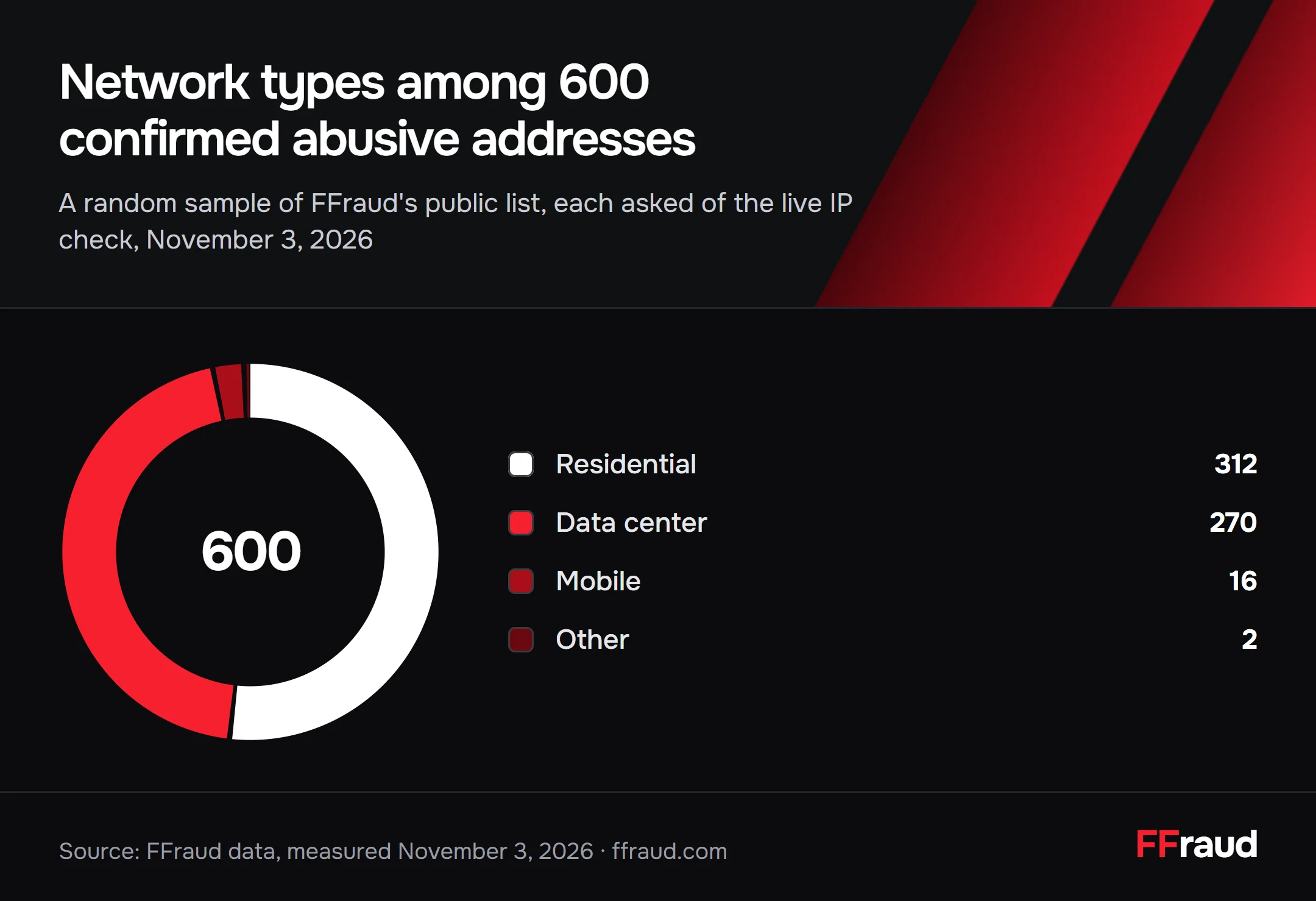
- Residential312
- Data center270
- Mobile16
- Other2
Source: FFraud data, measured November 3, 2026
- Block data center addresses for longer, and home and mobile addresses for shorter spans.
- Score the address together with the request, as an IP fraud score does, instead of blocking a home line forever.
- Expect several people behind one mobile or CGNAT address. A block there can hit them all.
- Refresh lists often. FFraud rebuilds its malicious IP database every 30 minutes.
#How we counted
We drew 600 addresses at random from the 1,651,067 rows of FFraud's public list of confirmed abusive IPs (the build of November 3, 2026, 18:31 UTC; each address was confirmed at least twice). Then we asked FFraud's public IP lookup about each one without a key, and counted the connection type it answered. 312 were residential, 270 data center, 16 mobile, one education and one relay. A sample of 600 gives each of the two large shares a margin of about four points either way.
A network type tells you what kind of line an address belongs to. How its provider hands that address out is a separate question. Providers describe dynamic addresses as the usual case at home: Superloop, an Australian provider, calls them "commonly used for residential internet connections". So read the chart as a guide to how fast entries go stale.
#Questions people ask
Is static or dynamic IP better?
Dynamic suits most homes. Static is worth it when something must reach you at a fixed address, such as a server or a partner's allow list.
Is a static IP faster than a dynamic IP?
No. The address type does not change the speed of your line.
Is a static or dynamic IP more secure?
Neither on its own. A static address is a fixed target, so keep what runs behind it patched. A dynamic one is harder to track over weeks.
How do I check if my IP is static or dynamic?
Check the WAN status on your router, or note your public address on What is my IP and look again in a few days. If it changed, it is dynamic.
Is static or dynamic IP better for gaming?
Give your console a fixed local address so port forwarding keeps working. Your public address only matters if you host a server.
Sources
- RFC 2131: Dynamic Host Configuration Protocol
- RFC 8981: Temporary Address Extensions for Stateless Address Autoconfiguration in IPv6
- RFC 6598: IANA-Reserved IPv4 Prefix for Shared Address Space
- RFC 6888: Common Requirements for Carrier-Grade NATs
- ipconfig
- Use DHCP or a manual IP address on Mac
- ip-fraud-database: confirmed abusive IPs (open data, MIT), build of 18:31 UTC
- IP intelligence API documentation
- Difference between static IP and dynamic IP
- Static vs. dynamic IP
- Static vs dynamic IP addresses